Create a client certificate
Learn how to create a client certificate for NetFoundry Frontdoor. Upload an existing certificate or generate a new one by submitting a certificate signing request (CSR), then configure the share to reference the certificate and test the connection to verify secure access.
Steps
- Frontdoor console
- Command-line interface
- From the Frontdoor console, click Certificates in the left-hand menu.
- Click the + icon to create a new client certificate.
- Enter a name for your certificate.
- Copy and paste the certificate data in OpenSSL PEM format into the Value field.
- Click Create.
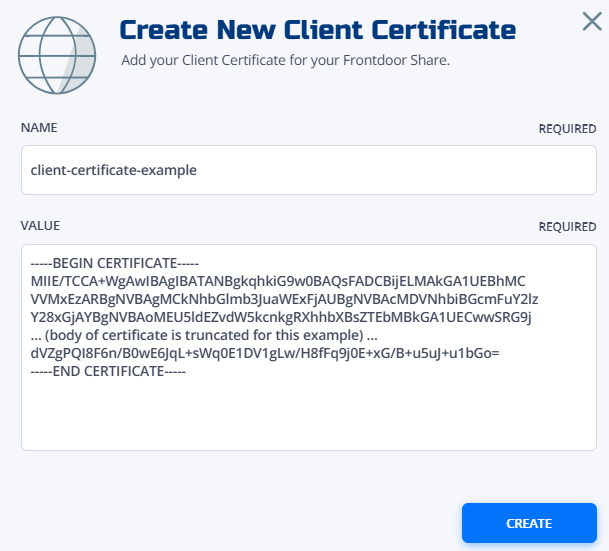
Your client certificate will appear in the certificate list. Reference this certificate in your share configuration for TCP shares.
-
Choose between uploading an existing certificate or generating from a certificate signing request (CSR):
-
Option A: Upload an existing certificate
Choose this option if you already have a trusted client certificate (in PEM format) that was issued by a third-party certificate authority:
curl -X POST \-H "Authorization: Bearer $TOKEN" \-H "Content-Type: application/json" \-d '{"name": "my-api-client","type": "CERTIFICATE","value": "-----BEGIN CERTIFICATE-----\nMIIB...""validYears": 1}' \"https://gateway.production.netfoundry.io/frontdoor/$FRONTDOOR_ID/client-certificates" -
Option B: Generate from a CSR using a bearer token
Choose this method to have NetFoundry Frontdoor issue and sign a new client certificate for a locally generated private key, authorizing the request with a full access bearer token:
# First, create a CSR locallyopenssl req -new -key private.key -out certificate.csr# Then submit to Frontdoorcurl -X POST \-H "Authorization: Bearer $TOKEN" \-H "Content-Type: application/json" \-d '{"name": "my-generated-cert","type": "CSR","value": "-----BEGIN CERTIFICATE REQUEST-----\nMIIB...""validYears": 1}' \"https://gateway.production.netfoundry.io/frontdoor/$FRONTDOOR_ID/client-certificates" -
Option C: Generate from CSR using a certificate request token
Choose this method to securely request a new certificate using a locally generated CSR and a specific, single-use certificate request token, which avoids exposing a full bearer token.
# First, create a CSR locallyopenssl req -new -key private.key -out certificate.csr# Then submit to Frontdoorcurl -X POST \-H "Content-Type: application/json" \-d '{"type": "CSR","value": "-----BEGIN CERTIFICATE REQUEST-----\nMIIB...""validYears": 1}' \"https://gateway.production.netfoundry.io/frontdoor/$FRONTDOOR_ID/client-certificates/token/67890abcde"
-
-
Reference the client certificate in your share configuration for authentication requirements.
-
Verify that your client can successfully authenticate using the certificate:
# Test with curlcurl -X GET \--cert client.crt \--key client.key \https://your-frontend.example.com/api/test# Test certificate validationopenssl s_client -connect your-frontend.example.com:443 -cert client.crt -key client.key
Troubleshooting
Certificate validation errors:
- Verify certificate format (PEM encoding)
- Check certificate expiration dates
- Ensure certificate chain is complete
- Validate key usage extensions
Connection failures:
- Confirm private key matches certificate
- Check certificate is properly referenced in share
- Verify client is presenting certificate correctly
- Review firewall and network connectivity
Performance concerns:
- Monitor TLS handshake times
- Consider certificate caching strategies
- Evaluate impact of certificate validation
- Optimize certificate chain length